

Extraction and pinned patterns
Waridex finds the codes and links in a message the moment it arrives, before anyone asks for them, so
wait with extract=otp answers from what is already stored. Extraction is deterministic:
the same message always gives the same result, and a miss explains itself.
A code is found in three layers; the first that applies wins.
- A pinned pattern of the workspace whose sender and subject match the message (below). Its match has
confidence 1 and method
pinned. - Heuristic scoring of every candidate in the text and HTML: runs of 4 to 8 digits, and 6 to 8 capital letters
and digits with at least one digit. A candidate scores higher near words such as “code”, “verification” or
“one-time”, when it stands alone on its line or in bold or a heading, when it has six characters and when it comes
early in the message; it scores lower when it looks like a year, a phone number, an amount or part of an address,
or sits in the footer. A word such as “order” or “phone” counts against the number it names, not against a code
the message labels: “Your phone verification code is 482913” and “Your code is 482913. Never share it over the
phone.” both give 482913. The best candidate is returned when it scores at least 0.5, with method
heuristic. The HTML is read as the reader sees it: text hidden withdisplay:none,visibility:hidden,opacity:0or thehiddenattribute, such as a preheader, neither holds the code nor labels one. A candidate found only there is listed with the reason “hidden from the reader” and never returned; a pinned pattern or your ownpattern, which read hidden text too, can still take it. A reply or a forward quotes an earlier message: the lines a plain-text reply marks with>, what follows an attribution line such as “On Monday, support wrote:”, Outlook’s original-message header or a forwarded-message header, ablockquoteor a mail client’s quote wrapper in HTML, and the subject of a reply or forward (“Re:”, “Fwd:”, after a tag such as “[EXTERNAL]”). While the message’s own words name a code that scores enough, a code found only in that quoted history is listed with the reason “in quoted reply history” and never returned, however it was formatted there; a number of the message’s that only the quoted text labels (“I tried 482913 twice” above a quoted “Your code is 771122”) is scored as any other but competes with the quoted codes on score instead of displacing them. A message that only quotes, such as a forwarded code, is read as the message it quotes. A number a label names as something other than a one-time code (a barcode, a bank’s sort code, a booking, reservation, customer or gate code such as “Booking code: K7XQ2P” or “Codice cliente: 48291302”) and the last digits of a masked phone or card number (“ending in 0132”, ”•••-•••-0132”) are listed and never returned. “Confirmation code” and “security code” alone still label a code, since sign-in mail uses both. - Your own regular expression, passed to
waitaspatternwithextract=otp, replaces both for that call: it runs over the subject, then the text and the HTML, and its first match is the code, with methodcustom.
minLength and maxLength (4 and 8 by default) keep only pinned and heuristic codes of that length; a pattern of
your own ignores them, so bound the length in the expression itself (\b\d{6}\b). Every candidate appears in
candidates with its confidence, the part it came from (text or html), up to 160 characters of context
around it and, for one that lost, a rejectedReason such as “looks like a year”.
Other languages and scripts
Section titled “Other languages and scripts”The heuristics are not English-only.
- Labels. Beside the English words, a number is labelled by
código,codice,kod,رمز,كود,コード,验证码,驗證碼and코드, and by the words that name a verification rather than a code:verif…,تحقق,認証and인증. The words that argue against a code are translated too, so a barcode stays out of the way whether the message calls it a barcode,código de barras,codice a barre,باركود,バーコード,条形码or바코드. - A label may touch its code. A candidate may not touch a cased letter, another digit or an underscore, so
A482913is an identifier and not a code. Scripts without case have no such spacing habit, so a label in one may run straight into its number:验证码是482913,認証コードは482913,رمزك482913and인증번호는482913each give 482913, as does a label a colon closes right before the number. - Digits. Arabic-Indic (
٤٨٢٩١٣), Eastern Arabic-Indic and full-width digits are mapped to ASCII before anything is scored, so the code is returned as482913whichever block the message wrote it in. Zero-width characters, which some senders put between the digits of a code, are removed, and non-breaking spaces are read as spaces.
Links are taken in this order, without duplicates: the HTML’s anchors in document order, then bare URLs in the HTML’s
text, then bare URLs in the plain-text part. An anchor therefore comes before a bare URL that appears above it in the
same HTML. mailto: and tel: links are left out, and footer and unsubscribe links go last. wait with extract=link returns
the first link, or with linkContains the first link containing that text.
When nothing is found
Section titled “When nothing is found”wait answers 422 extract.not_found instead of an empty result. The problem carries
the message’s id, subject and sender, the extraction result with every candidate and the reason each lost, warnings
that explain the miss (for example, that no candidate had the required length) and the first 2 KB of the body. The
message stays unread, so the test can call wait again with other settings.
Pinned patterns
Section titled “Pinned patterns”When a sender’s messages hold the code somewhere the heuristics cannot be sure of, pin a pattern for the workspace:
curl -sS https://api.waridex.com/v1/workspace/patterns \ -H "Authorization: Bearer $WARIDEX_API_KEY" \ -H "Content-Type: application/json" \ -d '{"senderPattern": "*@example.com", "subjectPattern": "*verification*", "regex": "code: (?<code>[0-9]{6})"}'senderPatternandsubjectPatternselect the messages. A value with*(anything) or?(one character) must match the whole sender or subject; a value without either matches when the sender or subject contains it, ignoring case. The sender is theFromheader, and its bare address too, so*@example.commatchesExample <no-reply@example.com>.regexis a .NET regular expression. Its group namedcodeis the code, else its first group, else the whole match.selector, optional, limits the search to the HTML elements it matches, for simple selectors such asstrong.otp.
POST /v1/workspace/patterns needs the pattern:manage scope, as does DELETE /v1/workspace/patterns/{id};
GET /v1/workspace/patterns lists them with how often and when each last matched. The Free plan holds two pinned
patterns; Team and Business hold any number.
The dashboard’s Patterns page proposes a pattern from a code in a message the workspace received, with the sender and subject filled in from that message, so a sender whose template the heuristics misread can be pinned without writing the expression by hand:
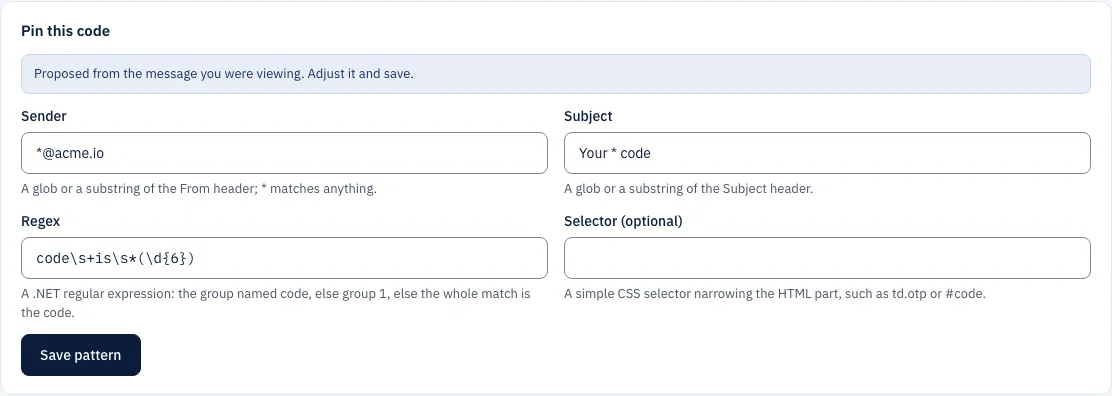
A message injected from a saved .eml file works for this as a received one
does, so a template can be pinned before the app under test is wired up.